自定义 MessageBox
MessageBox
- 创建一个 Window
- 窗口设置
ResizeMode: 用于定义右上角的窗体按钮ShowInTaskbar:不在系统任务栏显示WindowStyle:窗口风格,默认SingleBorderWindow
- 依赖属性
ButtonCommandProperty:只读的依赖属性,用于处理按钮点击后的结果ConfirmText、RefuseText、CancelText:分别对应含义为肯定的、否定的和取消的按钮,根据相应属性是否有内容来决定是否显示相应的按钮Title、Caption:需要显示的信息
遇到过一个问题,一开始直接使用控件继承来的
Content属性,但是它实际上是Window下的默认属性,会导致窗口中的内容被赋值的字符串替代
ShowDialogAsync
使用 TaskCompletionSource 来将同步的方法转换为异步,本质上是将手动编写回调方法的操作交给了编译器:
base.ShowDialog() 仍然需要在主线程:
    public async Task<MessageBoxResult> ShowDialogAsync(
        CancellationToken cancellationToken = default
    )
    {
        TaskCompletionSource = new TaskCompletionSource<MessageBoxResult>();

        CancellationTokenRegistration tokenRegistration = cancellationToken.Register(
            o => TaskCompletionSource.TrySetCanceled((CancellationToken)o!),
            cancellationToken
        );

        try
        {
            base.ShowDialog();

            return await TaskCompletionSource.Task;
        }
        finally
        {
#if NET6_0_OR_GREATER
            await tokenRegistration.DisposeAsync();
#else
            tokenRegistration.Dispose();
#endif
        }
    }
在离开窗口时异步地设置结果:
private void OnButtonClick(string buttonName)
{
    var result = buttonName switch
    {
        CONFIRM => MessageBoxResult.Yes,
        REFUSE => MessageBoxResult.No,
        CANCEL => MessageBoxResult.Cancel,
        _ => throw new ApplicationException(),
    };

    _ = TaskCompletionSource?.TrySetResult(result);

    base.Close();
}

protected override void OnClosing(CancelEventArgs e)
{
    base.OnClosing(e);

    if (e.Cancel)
    {
        return;
    }

    _ = TaskCompletionSource?.TrySetResult(MessageBoxResult.Cancel);
}
使用
属性的设置及方法的调用都需要在主线程:
[RelayCommand]
private async Task ShowOnUiThreadAndContinueOnNonUiThread()
{
    var result = await System.Windows.Application.Current.Dispatcher.Invoke(() =>
    {
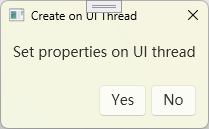
        var box = new MessageBox()
        {
            Title = "Create on UI Thread",
            Caption = "Set properties on UI thread",
            ConfirmText = "Yes",
            RefuseText = "No",
            WindowStartupLocation = System.Windows.WindowStartupLocation.CenterScreen,
        };

        var t = box.ShowDialogAsync();

        return t;
    });

    await Task.Run(() =>
    {
        if (result == System.Windows.MessageBoxResult.Yes)
        {
            Messenger.Send("I'm OK here.", nameof(MainViewModel));
        }
        else if (result == System.Windows.MessageBoxResult.No)
        {
            Messenger.Send("Cancelled.", nameof(MainViewModel));
        }
    });
}
理解
编译器对 await 的操作是将其后的代码片段转换成类似 Task.Continuation 的逻辑,本质上也是一种类似回调的逻辑,只不过是隐式由编译器实现的。
base.ShowDialog -> 窗口关闭时返回 -> 在 OnClosing 或 OnButtonClick 中设置结果 -> TaskCompletionSource.Task get -> ShowDialogAsync 结束返回