自定义 Snackbar
Usage
- 在应用所需显示 snackbar 的位置放置一个
ContentControl控件作为容器(在 WPF-UI 中,这个容器是SnackbarPresenter); - 在视图后台代码里注入
SnackbarService,然后把这个容器的引用传给 snackbarService; - 在所需的地方注入
SnackbarService调用Show方法;
SnackbarService
基本思路来自于 WPF-UI,不过做了一些简化。
实现了一个特性,能够把没来得及显示的消息缓存在队列里,然后依次显示,显示的过程中还可以随时关闭当前正在显示的,也不会影响后续的显示。
public void Show(string title, string message, InfoLevel infoLevel, TimeSpan timeout)
{
    SnackbarRecord record = PrepareProperties(title, message, infoLevel, timeout);

    Application.Current.Dispatcher.Invoke(async () =>
    {
        queue.Enqueue(record);

        // there's already a snackbar running
        if (queue.Count > 1)
        {
            return;
        }

        while (queue.Count > 0)
        {
            var r = queue.Peek();
            await ShowSnackbar(r);
            queue.Dequeue();
        }
    });
}
原理很简单,甚至不需要线程间同步,因为为了设置 UI 组件,需要运行在 UI 线程上。
每次收到一个消息时,加入队列,队列中如果已经有消息,那么直接返回。因为队列中已经有消息意味着已经有一个循环在处理。
出队的时候,显示结束再出队,而不是一开始就出队。
private async Task ShowSnackbar(SnackbarRecord record)
{
    var snackbar = new Snackbar();
    snackbar.SetCurrentValue(Snackbar.RecordProperty, record);

    if (contentControl is null)
    {
        throw new ApplicationException($"SnackbarService not has snackbar ContentControl set.");
    }

    contentControl.Content = snackbar;
    await snackbar.Show();
    await snackbar.Close();
    contentControl.Content = null;
}
ShowSnackbar 方法很直接,不过 Snackbar 的两个方法值得一提。
Snackbar
由于不希望额外地再引入资源字典,因此使用了 UserControl 的方式来实现 Snackbar。
public Snackbar()
{
    InitializeComponent();

    SetValue(CloseButtonCommandProperty, new RelayCommand<object>(_ => cancellationSource.Cancel()));
}
在最开始的版本中,我在 ShowSnackbar 中创建的 cancellationSource 变量,并通过一个 Closed 事件使得内外进行交互;
不过我认为现在这种方式内聚性更好一些。
public async Task Show()
{
    VisualStateManager.GoToElementState(this, "Shown", true);

    try
    {
        await Task.Delay(Record.Timeout, cancellationSource.Token);
    }
    catch (TaskCanceledException)
    {
        return;
    }
}
Show 方法是一个异步方法,它做两件事,显示,并等待返回。
这样实现是因为需要显示完之后需要调用关闭方法。
public async Task Close()
{
    var tcs = new TaskCompletionSource();

    var sb = Hidden.Storyboard;
    sb.Completed += (_, _) =>
    {
        tcs.SetResult();
    };

    VisualStateManager.GoToElementState(this, "Hidden", true);

    cancellationSource.Dispose();

    await tcs.Task;
}
Close 也是一个异步方法,它在“等待”动画结束。
snackbar 结束(动画也结束)之后,才可以将外面的 contentControl 设为空。
Ref
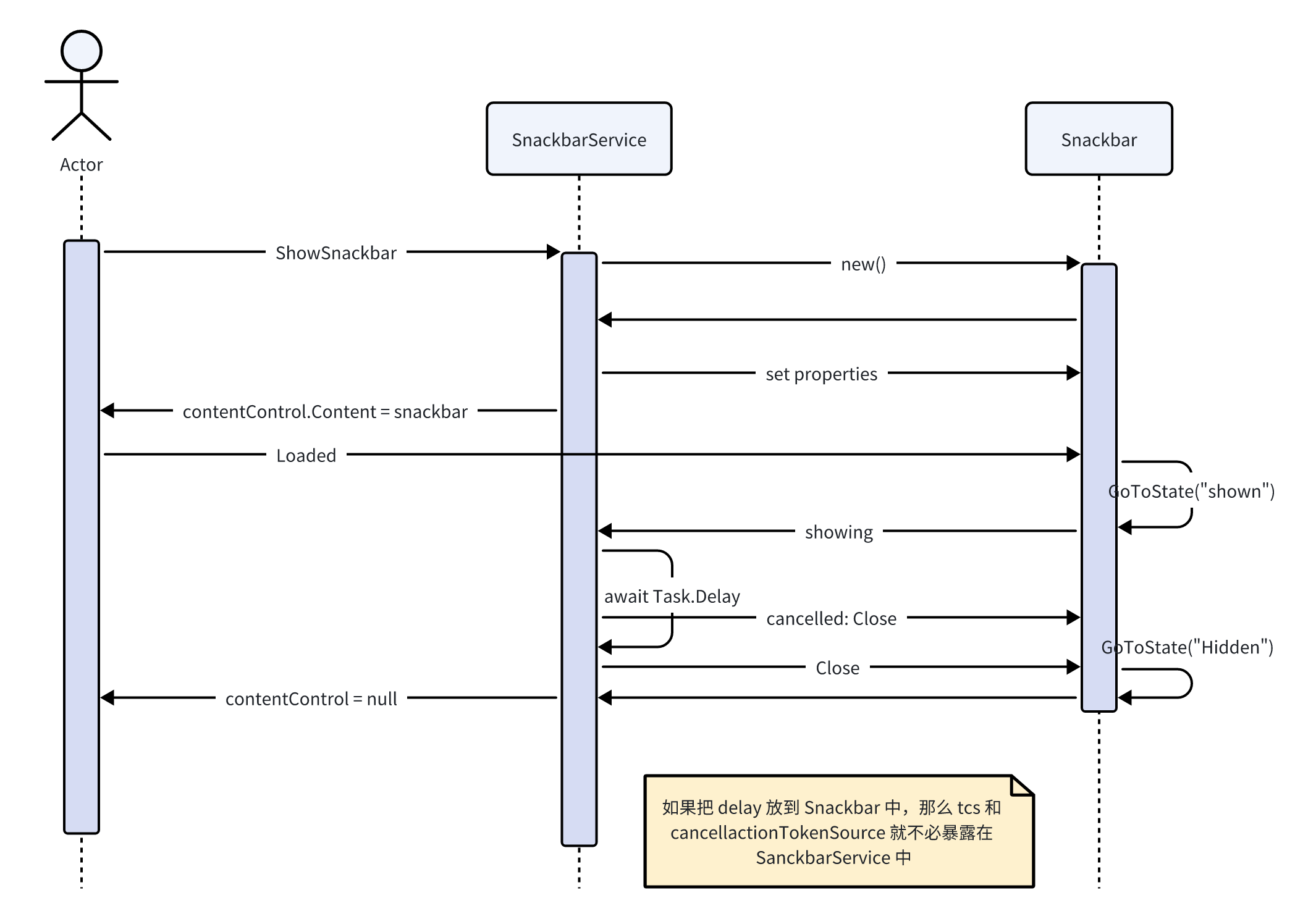
第一个版本的序列图(本文是关于修改后的版本的)
代码示例在:Github: orrest/Tests